Color is more than just an aesthetic choice; it's a powerful communication tool. In the digital age, achieving perfect color accuracy is paramount for any design project, from web interfaces to print layouts. The right shade can evoke emotion, enhance brand identity, and even influence user behavior and conversion rates. However, with an overwhelming array of color picker tools available, selecting the ideal one for your specific workflow can be a daunting task.
This guide cuts through the noise, providing a comprehensive, workflow-centric approach to help you master digital color accuracy. We'll explore expert-recommended color pickers tailored for diverse design fields—be it web development, UI/UX design, graphic design, print, or branding—ensuring you find the tool that perfectly aligns with your creative and technical requirements.
Why Color Accuracy is Non-Negotiable in Design
In a visually saturated world, precision in color application is a cornerstone of professional design. Inaccurate color representation can lead to inconsistent branding, a poor user experience, and even accessibility issues. Imagine a client's logo appearing slightly different on their website compared to their printed business cards – such inconsistencies can erode trust and brand recognition, as highlighted by design experts like those at DesignInDc.com.
Professional designers across various disciplines increasingly rely on sophisticated color picking tools to streamline workflows, ensure accuracy, and maintain brand consistency. The ability to precisely identify, replicate, and manage colors across different mediums is not just a convenience; it’s a fundamental requirement for delivering high-quality, impactful design work. From ensuring text readability for accessibility to maintaining a cohesive brand aesthetic, a reliable color picker is an indispensable asset.
Understanding Your Color Picker Needs: A Workflow-Centric Approach
The first step in choosing the best color picker is to understand your specific needs. Different design disciplines have unique requirements for color identification, manipulation, and output.
What Kind of Designer Are You? (Project Type)
Your primary design focus dictates the features you'll need most from a color picker:
- Web Development & UI/UX Design: For creating digital interfaces, your focus will be on web-standard color models like HEX, RGB, and HSL. Accessibility, particularly contrast ratios, is crucial for ensuring a positive user experience for all, as discussed in various web design communities. Integration with tools like Figma's color picker or Webflow is often a priority.
- Graphic Design & Print: When designing for physical output, CMYK (Cyan, Magenta, Yellow, Key/Black) values become critical for accurate reproduction. Designers often require tools integrated with professional software like Adobe Creative Suite to ensure consistent color across digital proofing and final print.
- Branding & Marketing: For maintaining a consistent brand identity across all touchpoints, palette creation, management, and easy sharing of color specifications are key. Tools that offer smart color suggestions or AI-powered palette generation can be incredibly valuable.
- General Creative & Multimedia: Whether you're working on video editing, presentations, or personal art projects, a straightforward color picker that can sample colors from images or your screen and translate them into various formats is essential for visual harmony. Even tools like CapCut offer color picking features for media creators.
Need a comprehensive UI/UX overhaul?
Our design team specializes in creating visually cohesive, accessible, and high-converting interfaces using industry-leading color systems and workflows.
Work With UsEssential Features to Consider
Regardless of your niche, certain features elevate a good color picker to a great one:
- Multi-format Support: The ability to output color values in HEX, RGB, HSL, and CMYK is crucial for adaptability across different design stages and mediums.
- Palette Creation & Management: Advanced tools allow you to save, organize, and export custom color palettes, ensuring consistency across projects.
- Accessibility Checks: For web and UI/UX designers, built-in contrast checkers ensure your color choices meet WCAG (Web Content Accessibility Guidelines) standards.
- Integration with Design Software: Seamless compatibility with your preferred design tools (e.g., Figma, Adobe products, Canva) can significantly boost efficiency.
- Eyedropper Functionality: The ability to sample colors directly from any pixel on your screen, an image, or a live website is fundamental. Tools like ImageColorPicker.com and RedKetchup.io's Color Picker exemplify powerful image-based picking.
- AI-powered Suggestions: Emerging tools, such as Huemint, leverage artificial intelligence to suggest harmonious color palettes based on your initial selections or input, pushing the boundaries of traditional color picking.
Types of Color Pickers and Their Advantages
The market offers a diverse range of color picker tools, each with distinct advantages for different scenarios.
Browser Extensions
Pros: These are incredibly convenient for web-centric tasks, allowing you to sample colors directly from live web pages with a single click. They offer quick access to HEX, RGB, and sometimes HSL values.
Cons: Functionality is often limited to the browser environment, and they may lack advanced features like palette management or CMYK support.
Examples: Color Picker for Chrome™ is a popular choice for developers and designers working within the Chrome ecosystem. Online tools like RedKetchup.io's Color Picker can also act as quick browser-based solutions.
Standalone Desktop Applications
Pros: Desktop apps provide a more robust experience, often featuring system-wide eyedroppers that can sample colors from any pixel on your screen, regardless of the application. They typically include advanced palette management, color scheme generators, and support for a wider range of color models.
Cons: They require installation and might consume more system resources.
Examples: While no specific third-party desktop app is listed in our sources, most operating systems include a basic built-in color picker, and numerous advanced applications are available for Windows and macOS.
Integrated Software Features
Pros: Color pickers built into professional design software offer the most seamless workflow. They are optimized for the software's environment, supporting its specific features and file types, and often integrating with other design tools within the suite.
Cons: Their functionality is typically confined to that specific software.
Examples: Adobe Photoshop and Illustrator, Figma's integrated color picker, Canva's brand kit tools, and Webflow's native color selector are prime examples.
Online Web Tools
Pros: Accessible from any device with an internet connection, these tools require no installation. Many offer specialized features like image-based color extraction, palette generation, or contrast checkers, often for free.
Cons: Requires an active internet connection, and some may contain advertisements.
Examples: ImageColorPicker.com allows you to upload an image and pick colors from it. The W3Schools HTML Color Picker is an excellent resource for web-specific color codes. Tools like Huemint provide AI-powered color palette suggestions online.
Tailored Recommendations: Matching Tools to Your Design Niche
Now, let's match the best color picker types to specific professional needs.
For Web Developers & UI/UX Designers
Your priority is accuracy in web-friendly color models (HEX, RGB, HSL) and adherence to accessibility standards.
- Browser Extensions like Color Picker for Chrome™ are invaluable for quick on-the-fly sampling from live websites.
- Integrated tools within platforms like Figma and Webflow offer seamless integration into your design and development workflow.
- Online tools with accessibility checkers are essential for ensuring sufficient contrast ratios, a critical aspect of UI/UX design. Platforms for web builders like Sitejet also embed color picking for cohesive site branding.
For Graphic & Print Designers
Accuracy in CMYK values and seamless integration with design suites are paramount for print work.
- Integrated color pickers within professional software like Adobe Photoshop, Illustrator, and InDesign are indispensable. They provide the necessary controls for spot colors, CMYK conversions, and accurate color profiling required for commercial printing.
- Standalone desktop applications that offer advanced color management features can also be beneficial for system-wide color sampling and calibration.
For Branding & Marketing Professionals
Consistency across all brand touchpoints and efficient palette management are key.
- Online tools with robust palette generation and management features, such as Canva's brand kit, help maintain brand guidelines.
- AI-powered color suggestion tools like Huemint can inspire new brand palettes or suggest complementary colors for campaigns.
- Figma's color picker is also excellent for collaborative branding efforts, allowing teams to share and iterate on palettes.
For General Creatives & Hobbyists
Simplicity, ease of use, and quick color extraction from images are often priorities.
- User-friendly online tools like ImageColorPicker.com are perfect for extracting colors from photographs or mood boards.
- Basic desktop color pickers included with your operating system or simple browser extensions provide straightforward functionality for everyday tasks.
- For media creators, even editing software like CapCut can offer color picking within its editing environment for specific creative projects.
Advanced Color Picker Features to Elevate Your Workflow
Beyond basic color sampling, advanced color picker tools offer features that can significantly enhance your efficiency and design quality:
- Color Model Conversion: Automatically convert between HEX, RGB, HSL, and CMYK, ensuring consistency across different platforms and output types.
- Palette Generation and Management: Create, save, organize, and export entire color schemes. Some tools can even generate harmonious palettes based on a single input color, or use AI like Huemint to suggest innovative combinations.
- Accessibility Checkers: These invaluable features analyze contrast ratios to ensure your text and background colors meet WCAG guidelines, making your designs accessible to a wider audience.
- Integration with APIs or Development Tools: For developers, some color pickers can integrate directly with code editors or offer API access for dynamic color generation.
- Eyedropper from Any Screen Element: Unlike basic browser extensions, advanced tools can pick colors from any part of your operating system, including images, other applications, or video content.
The Importance of Color Models: A Quick Refresher
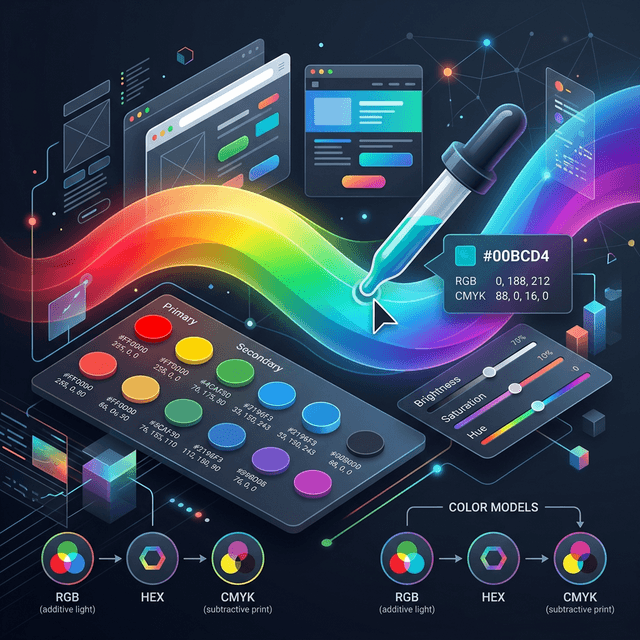
Understanding color models is fundamental to achieving accuracy across different media. A capable color picker will allow you to work within and convert between these:
- RGB (Red, Green, Blue): This additive color model is used for digital displays (monitors, TVs, web). Colors are created by combining varying intensities of red, green, and blue light.
- HEX (Hexadecimal): A six-digit alphanumeric code (#RRGGBB) representing RGB values, primarily used in web design and development. The W3Schools HTML Color Picker is an excellent example of a tool that provides HEX codes.
- HSL (Hue, Saturation, Lightness): A perceptual color model that describes color in terms of hue (the pure color), saturation (intensity), and lightness (brightness). It's often more intuitive for designers to work with than RGB or HEX.
- CMYK (Cyan, Magenta, Yellow, Key/Black): This subtractive color model is used for print. Colors are created by inks absorbing light, with black ("Key") added for depth and shadows. Accurate CMYK conversion is crucial for print output, a specialty of professional software like Adobe Creative Suite.
Ensuring your chosen color picker handles these conversions accurately is key to maintaining consistent color representation across digital and print mediums, preventing costly discrepancies.
Integrating Your Chosen Color Picker into Your Workflow
Selecting the perfect color picker is just the first step; integrating it smoothly into your daily design routine is what truly unlocks its potential.
- Leverage Shortcuts: Learn keyboard shortcuts for quick access to your eyedropper tool or color palette.
- Synchronize Palettes: If your tool supports it, synchronize your custom color palettes across different devices or design applications to maintain consistency.
- Automate Accessibility Checks: Make accessibility checks a routine part of your design process, especially for web and UI projects. Many tools offer quick contrast ratio evaluations.
- Stay Updated: Color technology and standards evolve. Keep your tools updated to benefit from the latest features and improved accuracy.
By thoughtfully integrating your chosen color picker, you'll not only enhance the accuracy of your designs but also significantly boost your overall productivity.
Conclusion
The pursuit of perfect color in design is an ongoing journey, but with the right color picker tool, it becomes an achievable goal. By understanding your specific project needs, exploring the diverse range of available tools, and focusing on features that genuinely enhance your workflow, you can master digital color accuracy.
Whether you're a web developer meticulously crafting accessible interfaces, a graphic designer perfecting print output, or a branding expert ensuring consistent visual identity, there's a color picker designed for you. Invest the time to choose wisely, and you'll find that the right tool doesn't just pick colors—it unlocks your full creative potential. Choose the color picker that truly complements your artistic vision and technical requirements, and elevate your design projects to new heights of precision and professionalism.